
You know the drill. Every quarter, the board asks, “What’s our AI strategy?” and you have to translate that into actual software that doesn’t break the budget.
From what I’ve seen in the field, picking a CRM right now isn’t just about managing contacts anymore; it’s about choosing an intelligence layer that your team will actually use.
If you are looking at Salesforce Sales Cloud versus HubSpot CRM, you are really choosing between two very different philosophies on how artificial intelligence should work.
Salesforce is solving for Reasoning—building an “Atlas” brain that plans multi-step paths to solve problems. HubSpot is solving for Context—curating a 200-million-profile dataset that the AI can instantly access without needing to “think” about where to find it.
In this guide, I’m going to cut through the marketing noise and look at the real operational efficiency numbers—from the true cost of “Data Cloud” prerequisites to the practical reality of deployment timelines.
Let’s look at the data, the hidden costs, and which platform actually fits your roadmap.
Key Takeaways
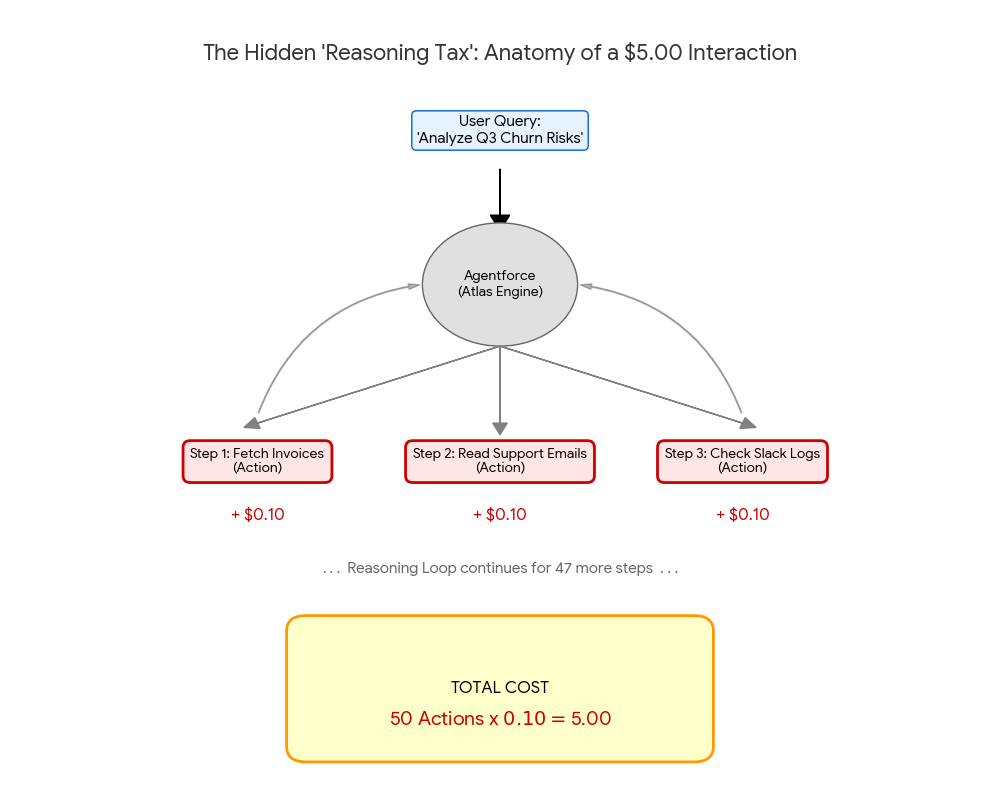
- The Hidden “Reasoning Tax” (Salesforce): Salesforce offers two pricing models: a $2/conversation flat-rate for predictable budgeting, or “Flex Credits” ($0.10 per Action at list price) for granular control. Enterprise volume discounts can lower the per-action cost, but at list price, if an agent enters a “reasoning loop”—taking 50 steps to solve a complex problem—a single interaction can spiral to $5.00+, making prompt engineering a financial necessity. See Figure 1 below.
- The Hidden “Enrichment Drain” (HubSpot): HubSpot charges a fixed unit cost of approximately $1.00 per conversation for its autonomous agents (such as Customer Agent). Standard Breeze Copilot features—the sidebar assistant for summarizing deals and drafting emails—are typically bundled into Sales/Service Hub Professional+ seat licenses at no extra per-use cost. However, Breeze Intelligence data enrichment scales linearly regardless of tier. Enabling auto-enrichment for just two properties (e.g., Revenue & Industry) across 10,000 leads can trigger a $2,000 bill overnight. You must treat autonomous agents and enrichment as variable operating expenses, not fixed features.
- Infrastructure as a Prerequisite: Salesforce Agentforce is not a standalone app; it relies on the Atlas Reasoning Engine, which mandatorily requires Data Cloud to provide the “grounding” layer for the AI. This shifts your budget from simple user licensing to a heavier consumption-based architecture (storage + compute).
- The “17-Day” Myth: Ignore the marketing claim that Salesforce deploys in 17 days. That figure often applies to basic SMB setups. A true enterprise Agentforce deployment—involving Data Cloud harmonization and defining reliable “Actions”—is typically a 90-day architectural project.
- Strategic Verdict: Choose Salesforce if you need an “Operating System” where agents autonomously plan complex workflows (High Complexity, High Power). Choose HubSpot if you need a “Growth Engine” where agents simply fetch context to accelerate human teams (High Velocity, Low Friction).
What is an AI-Powered CRM?

An AI-powered CRM isn’t just a database with a chatbot attached. It is a system where machine learning actively predicts your next best revenue move.
Think of it less as software and more as a proactive analyst that lives in your server.
“The real value of an AI CRM is not in generating text, but in its ability to synthesize unstructured data—emails, call transcripts, and slack messages—into a structured strategy.”
What are the key features of AI-powered CRMs?
If you strip away the buzzwords, AI-powered CRM software needs to do three specific things: predict, automate, and generate.
Here is what you should actually look for in the feature set:
- Predictive Lead Scoring: This goes beyond basic points. It uses predictive analytics to look at historical win rates and tell reps, “Ignore lead A, call lead B,” boosting sales forecasting accuracy.
- Generative AI Agents: Tools like Salesforce’s Agentforce or HubSpot’s Breeze Agents can autonomously research prospects and draft personalized outreach.
- Conversation Intelligence: This records calls and uses sentiment analysis to flag at-risk accounts based on the customer’s tone of voice, not just what they clicked.
- Unified Data Foundation: You cannot have good AI with bad data. Salesforce uses Data Cloud and HubSpot uses Smart CRM to clean and unify data before the AI touches it.
- Automated Data Enrichment: The system should automatically fill in missing phone numbers, titles, and company revenue without a human lifting a finger.
- Journey Orchestration: AI monitors customer behavior across your website and email to trigger the perfect follow-up at the exact moment of intent.
- Workflow Automation: This involves “If this, then that” logic on steroids, where AI decides the “then” based on context, such as routing a VIP ticket to a senior agent immediately.
Why is AI important in CRM systems?
The math is simple: operational efficiency.
Without AI, your expensive sales reps spend about 60% of their time on non-selling tasks like data entry and researching prospects.
With AI technologies handling the grunt work, your team focuses on closing.
I’ve seen marketing automation teams double their output because generative AI drafts the variations for them.
It turns your CRM systems from a passive record-keeping tool into an active revenue engine.
Overview of Salesforce Einstein
Salesforce is the heavyweight champion for a reason. Its new “Agentforce” platform is built on the Atlas Reasoning Engine, which allows AI to “think” and plan multi-step tasks rather than just responding to prompts.
What are Salesforce Einstein’s core AI capabilities?
Salesforce differentiates itself with “Agentforce,” which replaces the older “Einstein” copilots with fully autonomous agents.
- The Atlas Reasoning Engine: This is the brain. It allows an agent to break down a complex goal (“Update all Q4 opportunities”) into a logical plan and execute it step-by-step.
- Data Cloud Integration: This is critical. Salesforce connects structured and unstructured data from outside the CRM (like Snowflake or Google BigQuery) to ground the AI in reality.
- Einstein Trust Layer: For CTOs, this is the selling point. It uses a “Zero Data Retention” policy, meaning your data is masked before it hits any LLM, ensuring no proprietary secrets leak out.
- Predictive Analytics: It is still the market leader in predictive lead scoring, offering deep customization on how the score is calculated.
What key tools and integrations does Salesforce Einstein offer?
The tool library is massive, and that is its superpower.
You aren’t just buying a tool; you are buying into the AppExchange economy.
- Agentforce Service Agent: An autonomous bot that resolves customer cases 24/7 without human handoff, using your knowledge base.
- Sales Cloud Einstein: Includes sales forecasting and opportunity insights that tell managers exactly why a deal is stalled.
- MuleSoft Integration: If you have legacy ERPs (like SAP or Oracle), MuleSoft is the bridge that feeds that data into the AI engine.
- Slack Integration: Since Salesforce owns Slack, the “Conversational AI” features here are deep, allowing you to update records directly from a chat window.
- Tableau Pulse: Delivers advanced analytics and digests of complex data in plain English, directly to your inbox.
How can businesses use Salesforce Einstein?
The primary use case here is for complex, multi-team orchestration.
For example, a healthcare company can use Agentforce to autonomously schedule patient follow-ups while checking compliance logs in real-time.
Financial firms use the predictive analytics to model risk across millions of transaction records.
However, be aware: to get these results, you typically need to implement the Salesforce Data Cloud, which can be a significant line item in your budget.
Overview of HubSpot AI
HubSpot has rebranded its intelligence layer as “Breeze,” and honestly, it lives up to the name. It is designed to be “easy-to-use” and is often included in the base subscription cost.
What are HubSpot AI’s core AI capabilities?
HubSpot focuses on “Breeze Copilot,” “Breeze Agents,” and “Breeze Intelligence.”
- Breeze Copilot: An always-on assistant that lives in the sidebar. You can ask it to “Summarize this deal,” “Draft a follow-up email,” or “Find companies in Boston.” This feature is typically bundled into Sales/Service Hub Professional+ seat licenses at no additional per-use cost.
- Breeze Agents: These are specialized, autonomous bots that carry consumption costs. The “Social Media Agent” can write and post content. The “Prospecting Agent” can research leads and add them to the CRM. The “Customer Agent” handles support queries autonomously.
- Smart CRM Foundation: Because HubSpot was built on a single codebase (unlike Salesforce’s acquisition-heavy model), its data is unified by default. This makes the AI more accurate out of the box without complex mapping.
- Content Remix: A favorite for marketing teams. You feed it one blog post, and it quickly generates an email, three social posts, and an ad caption.
What key tools and integrations does HubSpot AI provide?
HubSpot’s tool library is smaller than Salesforce’s, but it covers the modern tech stack perfectly.
- Breeze Intelligence: This is their new data enrichment engine. It automatically updates over 200 million company profiles, giving you fresh data without buying a separate tool like ZoomInfo.
- Operations Hub: Uses AI to fix formatting issues (like capitalizing names) and deduplicate records automatically.
- Google Workspace & Microsoft 365: The integration is smooth. The AI can read your calendar and email to log activity without you clicking a button.
- Sales Hub: Includes predictive lead scoring that sets itself up. You don’t need a data scientist to configure the weighting; the model learns from your closed-won deals.
How can businesses benefit from HubSpot AI?
Speed is the killer feature here.
I’ve seen mid-market companies turn on HubSpot’s predictive lead scoring and start seeing value in 24 hours.
For customer engagement, the AI chatbots are easy to configure, allowing you to deflect support tickets immediately.
If your team is lean and you don’t have a dedicated “CRM Administrator,” HubSpot’s Breeze is likely the safer bet.
Hidden Cost Alert: HubSpot’s autonomous agents (like Customer Agent) charge a fixed unit cost of approximately $1.00 per conversation—this is not a spending cap, meaning high-volume usage will scale your costs linearly. Note that standard Breeze Copilot sidebar features are bundled into Professional+ seat licenses and do not incur per-use fees. However, Breeze Intelligence enrichment works on a consumption model. Auto-enriching your database scales linearly—enriching 10,000 leads with just two data points (e.g., Revenue & Industry) can trigger a $2,000 credit bill overnight. Turn on autonomous agents and enrichment with caution.
Comparing Salesforce Einstein and HubSpot AI
This is where the rubber meets the road. Let’s look at the hard specs side-by-side.
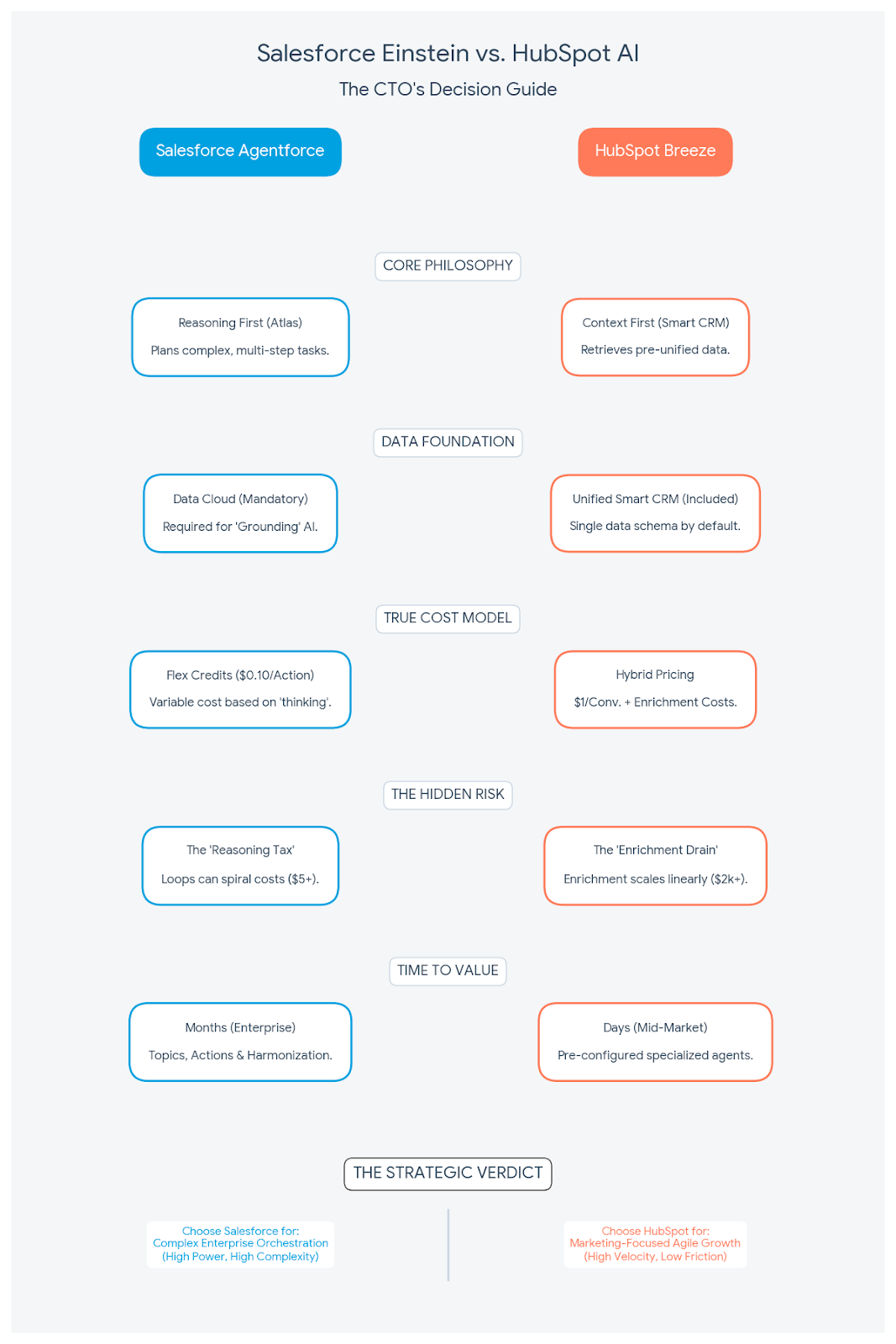
| Feature | Salesforce Agentforce | HubSpot Breeze |
|---|---|---|
| Primary Physics | Reasoning First (Atlas Engine) Plans complex, multi-step tasks. | Context First (Smart CRM) Retrieves pre-unified data instantly. |
| Data Foundation | Data Cloud (Mandatory) Required for “Grounding” the AI. | Unified Smart CRM (Included) Single schema by default. |
| True Cost Model | $2/conversation flat-rate OR Flex Credits ($0.10/Action at list price) Enterprise volume discounts available. | Copilot: Bundled in Pro+ seats. Autonomous Agents: ~$1.00/conversation. Scales with volume. |
| Time-to-Value | Months (Enterprise) Requires defining Topics & Actions. | Days (Mid-Market) Pre-configured specialized agents. |
AI-driven analytics and reporting
Salesforce wins on depth. With Tableau and Data Cloud, you can visualize literally anything.
If you need to cross-reference customer churn with global supply chain data, Salesforce can do it.
HubSpot is better for “in-app” reporting. Its reports are cleaner and easier for a sales manager to build, but they lack the infinite customizability of Salesforce.
Predictive lead scoring
Both platforms use machine learning to score leads, but the setup differs.
HubSpot’s scoring is “black box” but effective—it just works based on your history.
Salesforce allows you to tweak the model’s weightings manually.
If you have a data science team that wants to control the algorithm, they will prefer Salesforce.
Automation and workflow design
Salesforce Flow is a beast. It can automate complex business logic across multiple departments.
However, it often requires a specialized admin to maintain.
HubSpot Workflows are intuitive. A marketing manager can build a complex nurturing sequence in ten minutes.
For operational efficiency in mid-sized teams, HubSpot usually delivers faster ROI.
User interface and ease of use
This is HubSpot’s home turf. The interface is consumer-grade—clean, fast, and logical.
Salesforce “Lightning” UI is powerful but can feel dense and click-heavy.
Adoption is the biggest hurdle in CRM success; if your reps hate the UI, they won’t enter data.
HubSpot’s high usability scores directly correlate to better data quality because users actually use it.
Benefits of AI-Powered CRMs for CTOs
Why should you fight for the budget to upgrade to these tools? Because the old way of managing customer data is dead.
How do AI-powered CRMs enhance decision-making?
They move you from “lagging” to “leading” indicators.
Instead of looking at last month’s sales report, predictive analytics show you next month’s gap.
With real-time insights, a CTO can see that “Service Tickets are spiking in the Northeast” and correlate it with a product update deployment instantly.
How do AI-powered CRMs improve customer experience?
Your customers expect instant answers.
AI chatbots and conversational AI can resolve 60-80% of routine queries instantly.
This improves customer satisfaction scores because nobody likes waiting on hold.
Furthermore, sentiment analysis can alert a human manager to intervene before a customer gets angry enough to churn.
How do AI-powered CRMs support scalability and efficiency?
AI scales infinitely; humans do not.
When you launch a new product, generative AI can handle the spike in inbound questions without you needing to hire ten temporary support agents.
This scalability is crucial for modern strategic planning.
Challenges in Implementing AI-Powered CRMs
It’s not all sunshine and automated revenue. There are real risks you need to mitigate.
What integration challenges can arise with AI-powered CRMs?
The biggest lie in software is “plug and play.”
Connecting Salesforce Agentforce to a legacy on-premise ERP is a major engineering project.
You may face data silos where the AI can’t “see” the inventory data it needs to answer customer questions.
HubSpot mitigates this with a unified backend, but even then, integrating with niche industry tools can require custom API work.
What are the data privacy and security concerns?
This is the big one. You are feeding your proprietary customer data into a model.
Salesforce addresses this with the Einstein Trust Layer, which ensures data governance by not retaining your data in the LLM.
HubSpot also has strong “AI Trust” features, ensuring that generative AI respects user permission sets.
You must verify where your data is processed, especially for GDPR compliance.
The Future of AI in CRM Systems
We are moving from “Copilots” (assistants that wait for commands) to “Agents” (workers that act autonomously).
What are the latest trends in AI-powered CRMs?
The market is shifting fast.
- Autonomous Agents: Agents that don’t just suggest an email, but send it and book the meeting.
- Voice-First CRM: Using conversational AI to update records by voice while driving.
- Hyper-Personalization: Generative AI creating a unique landing page for every single visitor.
- Video AI: Tools that automatically generate personalized video follow-ups for sales reps.
Which emerging technologies should CTOs watch?
Keep an eye on Reasoning Engines like Salesforce’s Atlas.
These systems can “reason” through a problem, checking inventory, reading a contract, and then drafting a reply.
Also, look for Small Language Models (SLMs) that run cheaper and faster for specific tasks than massive models like GPT-5.
How to Choose the Right AI-Powered CRM for Your Business
Don’t just buy the brand; buy the solution that fits your complexity.
How to assess your business needs and goals for AI CRM?
If you are a massive enterprise with complex supply chains and a dedicated IT staff of 50+, Salesforce Sales Cloud is your safest bet for power.
If you are a growth-focused company that wants to move fast and keep overhead low, HubSpot CRM offers a better time-to-value.
How to evaluate scalability and customization options?
Ask yourself: “Do I have the budget for a full-time administrator?”
If the answer is no, Salesforce might become a burden.
Check the customization options—HubSpot is flexible, but Salesforce is practically a development platform.
Conclusion
The choice between Salesforce Einstein and HubSpot AI comes down to a trade-off: Power versus Agility.
Salesforce’s Agentforce offers unmatched depth and security for the enterprise, provided you have the budget for the Data Cloud foundation.
HubSpot’s Breeze delivers incredible artificial intelligence utility immediately, with a unified data model that makes adoption painless.
My advice? Audit your data hygiene first.
The best AI in the world can’t fix a broken database, but the right platform can help you build a future-proof engine for growth.
FAQs
1. What are the main differences between Salesforce Einstein and HubSpot AI for customer relationship management?
Salesforce’s Agentforce and Data Cloud architecture allow for highly custom AI agents that support complex enterprise logic, but this power requires significant developer resources to maintain. In contrast, HubSpot’s Breeze AI focuses on immediate utility through pre-built tools like Breeze Copilot and Intelligence, allowing technical leaders to deploy effective AI features across the entire customer platform without a heavy implementation lift.
2. How do these AI-powered CRMs use predictive analytics in sales forecasting?
Salesforce Einstein Forecasting analyzes your historical opportunity data to build a custom model that predicts revenue and flags pipeline risk, though it typically requires at least two years of clean data to function effectively. HubSpot uses its Breeze Intelligence engine to apply predictive probability to your deal stages instantly, offering a lighter-weight solution that delivers accuracy without the extensive historical training period.
3. Can Salesforce Einstein or HubSpot AI automate lead scoring processes?
Salesforce Einstein Lead Scoring offers two approaches: Global models that work with little to no historical data for quick deployment, and Custom models that build unique scoring based on your past successful conversions but generally need a dataset of at least 1,000 closed leads to generate reliable scores. HubSpot’s Breeze Intelligence bypasses this cold-start problem by referencing a proprietary database of over 200 million buyer and company profiles to score your incoming leads immediately based on fit and intent signals.
4. Do these platforms support conversation intelligence and sentiment analysis?
Salesforce Einstein Conversation Insights (ECI) is a standalone powerhouse that supports 36 languages and offers deep sentiment analysis to surface trends across thousands of calls. HubSpot’s conversation intelligence is embedded directly into the CRM timeline and focuses more on helping sales managers to quickly review calls and coach reps on specific keywords or objections.
5. Are there unique workflow automation capabilities in either system?
Salesforce Flow combined with the new Agentforce allows you to build autonomous agents that can trigger complex, multi-system actions across your ERP and legacy databases. HubSpot’s automation relies on Breeze Agents, such as the Prospecting Agent, which can autonomously research and engage leads, handling repetitive tasks efficiently without the need for complex Apex coding.
6. How does integration with other software compare between Salesforce Einstein and HubSpot AI?
The Salesforce AppExchange remains the industry leader with over 6,000 apps, making it the only viable choice for integrating with obscure or legacy enterprise systems. HubSpot’s App Marketplace is more focused on modern SaaS tools, offering over 1,500 integrations that prioritize bidirectional data sync and ease of setup over total customizability.